
Opinion · Emails and phishing
I received this email in 2024. And I can confirm that, to this day, nothing has changed (unlike my password!).
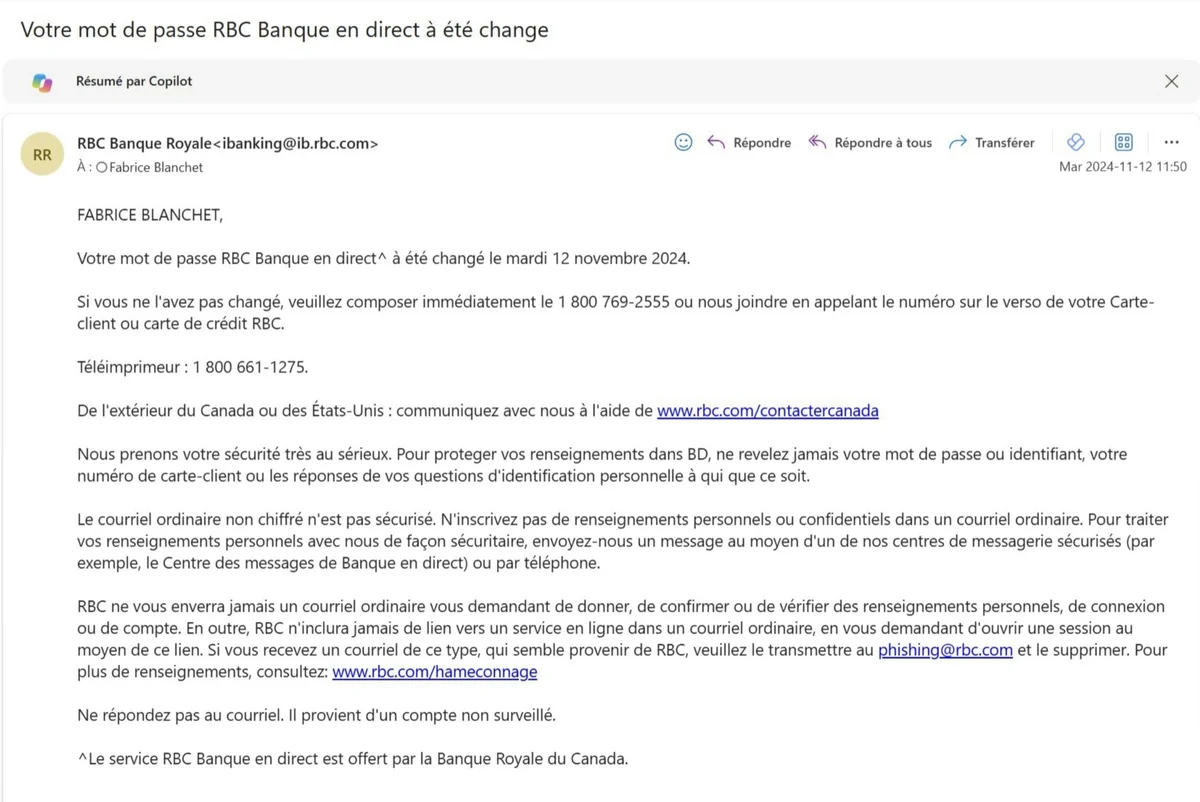
As an IT consultant, I keep telling my clients to be wary of emails full of mistakes, because it’s often a sign of fraud. How are they supposed to tell the difference when Royal Bank itself has been sending official emails riddled with errors for two years? The French version of its notices reads “Votre mot de passe à été change”, a sentence with two mistakes in three words. We expect better from an institution of this size.
The mistakes, one by one
Here is the text of the email (excerpt), with the mistakes flagged. The email was sent in French to French-speaking clients, so the quotes are in French with an explanation in English.
Votre mot de passe RBC Banque en direct^ à été changé2 le mardi 12 novembre 2024.
[…] Pour proteger3 vos renseignements dans BD4, ne revelez5 jamais votre mot de passe ou identifiant, votre numéro de carte-client ou les réponses de vos questions6 d’identification personnelle à qui que ce soit.- “à été change”: it should be “a été changé” (“has been changed”). The verb “avoir” takes no accent, and the past participle needs one. Two mistakes in three words, in the subject line.
- “à été changé”: the same mistake on the verb, in the very first sentence.
- “proteger”: missing accent, should be “protéger” (protect).
- “dans BD”: an internal abbreviation (probably “Banque en direct”, RBC’s online banking) left in the template.
- “revelez”: two missing accents, should be “révélez” (reveal).
- “les réponses de vos questions”: the correct phrasing is “les réponses à vos questions” (the answers to your questions).
Six mistakes in a security notice a few lines long, sent automatically to thousands of clients. A template like this gets fixed once, in a few minutes.
Why it’s a security issue
Spotting mistakes is one of the first reflexes we teach for recognizing phishing. When a major bank sends poorly written emails itself, it blurs that signal: its clients get used to receiving imperfect “official” messages, and have no reason to be suspicious when a fake one arrives with the same flaws.
Meanwhile, fraudsters write better and better, often with the help of artificial intelligence. The result: the real thing looks fake, and the fake looks real.
Key takeaways for your team
- Mistakes are a clue, not proof. An error-free email can be fraudulent, and an email full of mistakes can be genuine.
- The right reflex doesn’t change: don’t click any link. Open your bank’s app yourself or type its address in your browser.
- When in doubt, call the number on the back of your card, never a number received by email or text message.
In RBC’s defence: this email contains no sign-in link and asks for no information. In substance, it’s exactly what a legitimate notice should do. It’s the form that falls short.
To go further, read our articles on CEO fraud and on 12 steps to protect your business in 2026.
Rigour is a security matter too.
What do you think? Write to me at info@appelezletech.com or call me at 1 833 444-1041.
Want to teach your team to recognize phishing?
Appelez le tech · 1 833 444-10419 documents ready to adapt: IT policy, disaster recovery plan, incident response, Law 25 register and cyber insurance readiness.